

In this article
Product updates
Inspector Debugger and what's upcoming in Avo
Journey builder updates and a sneak peak of a Figma Integration and the Avo MCP
Hi everyone,
Analytics tracking QA is tedious and unreliable. Teams either spend hours manually checking events against a stale spreadsheet spec, or skip it and find out something's broken in production. The Inspector Debugger is built to close that gap. Open your app, click around, and see immediately what's firing correctly and what isn't, before any of it hits production.
Also in this newsletter:
- Journey Builder improvements and other fresh updates
- Upcoming: Avo MCP (we know you’ve been waiting for this one) and a Figma integration (and this one)
Introducing the Inspector debugger
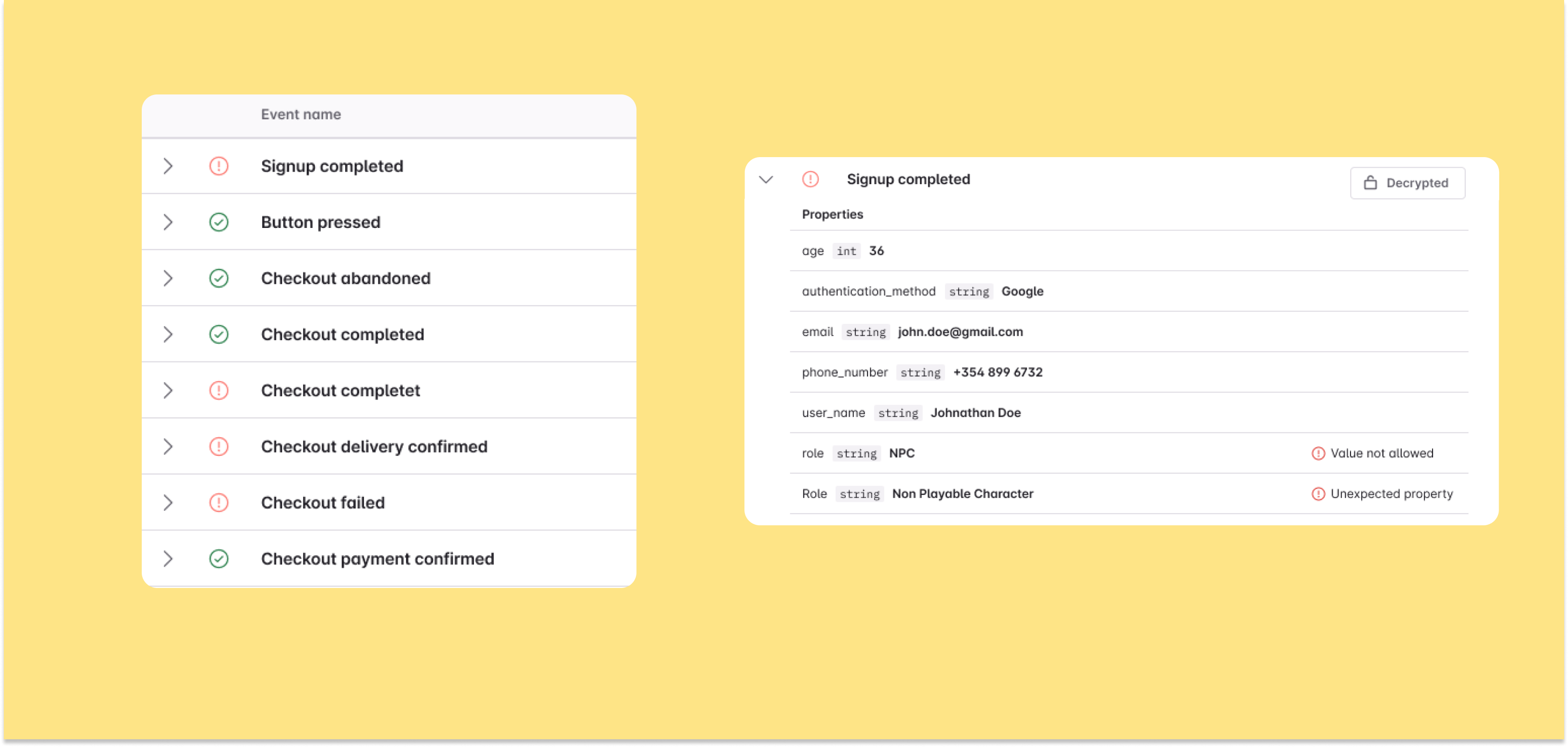
The Inspector Debugger streams events from your app and checks them against a specific branch of your Avo tracking plan. When you start a session, Inspector gives you a stream ID to filter on only the events you are firing. When something's off, it tells you exactly what: missing properties, wrong types and unexpected values.
A note on privacy: value validation runs on the device. Inspector logs the data shape and the issue, not the raw value, so nothing sensitive leaves you application. If you want to see which specific value triggered a problem, you can add an encryption key. Values get sent encrypted and decrypted locally. Avo can't read them.
Available now via Segment and Google Tag Manager integrations, and our Web, iOS, and Android SDKs.
Read the release blog post → Introducing the Inspector debugger
Read the docs → Inspector Debugger
Journey Builder: what's new since December
We’ve made several improvements to the Avo Journey Builder based on feedback from teams using Journeys:
- Copy-paste and duplicate. Cmd+C / Cmd+V for triggers and steps. You can also duplicate entire journeys.
- Undo. Works across creation, movement, resizing, and deletion.
- Middle mouse panning. Pan the canvas without switching to a pan tool.
- Performance and trigger annotations. We shipped a big performance update and rebuilt how trigger annotations are positioned, fixing an annoying bug where annotations moved around after you'd placed them on a journey step.
Coming soon: Figma integration. Connecting Figma designs to a journey currently means uploading screenshots by hand. We're building a direct Figma-to-Journey connection. We're in user interviews now. If your team works heavily in Figma, we'd love to hear from you.
Learn more → Journeys launch post
Smaller updates
Source-specific variants. Add and remove sources directly on a variant, without touching the base event first. -> Variants docs
Swift 6 support. iOS Codegen supports Swift 6 strict concurrency with a SwiftActor implementation.
Android Inspector on Maven Central. Alongside JitPack.
Coming soon: Avo MCP
AI tools like Cursor, Claude, and Copilot don't know anything about your tracking plan. You end up copy-pasting event definitions, explaining naming conventions by hand, hoping nothing gets lost.
We've built an MCP server that connects your AI agents directly to your Avo workspace. This first version is read-only: browse the tracking plan, check branch review status, pull a full implementation guide for any branch. We're a couple of weeks out from launching it. We're already working on what comes next, write access, so agents can propose changes to your tracking plan through the MCP.
Reach out if you'd like early access.
As always, we'd love your feedback. Happy debugging 💛
Block Quote