
In this article

Announcements
Govern your PII, right in your tracking plan
Custom fields and PII classification are now live for Enterprise
Hi Everyone,
Remember the custom fields and PII classification we mentioned last time? They're out of beta and live for Enterprise workspaces now, no waitlist.
"Which of your events carry personal data?" has always meant piecing together a privacy tool, a spreadsheet, and whoever remembers, and hoping they line up. And the most dangerous answer is the property nobody ever classified. Now your tracking plan just answers it, under the same review your team already runs in Avo.
Also in this newsletter:
- More for your agents in the MCP: read journeys, write triggers
- A few smaller things we shipped
- What is coming up, and how to shape it
🛡️ Custom fields and PII classification, now live
Your tracking plan already keeps your event names, types, and required properties consistent, and puts every change through review. Now it does the same for the data about your data, from a new Tracking Plan → Governance home.
PII classification
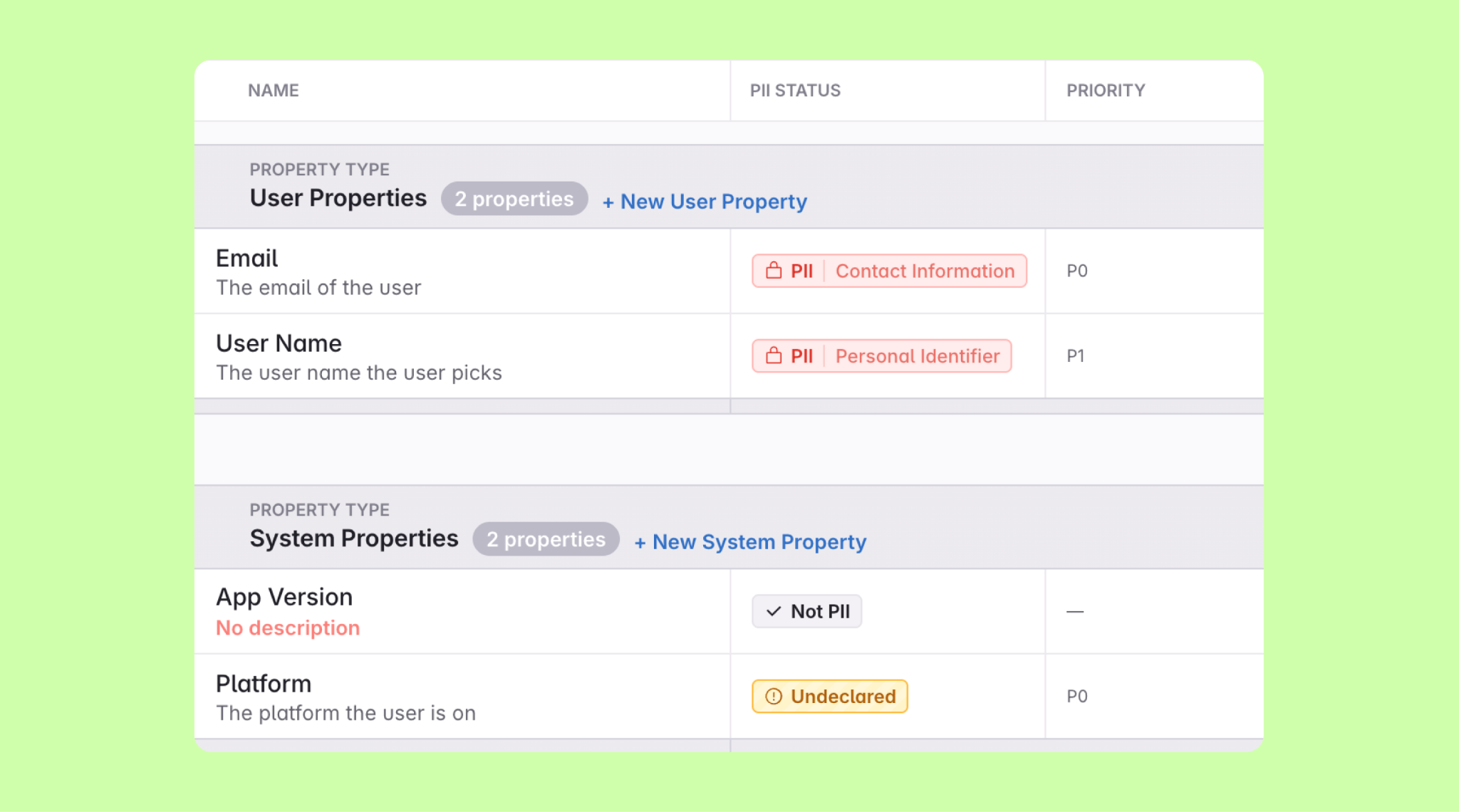
Every property lands in one of three states: Undeclared, Not PII, or PII with a type. So "nobody has looked yet" finally reads differently from "someone checked and it's clean." You define the PII types, starting from a set of industry defaults, and each event works out its own "Contains PII" from the properties it sends. Turn on the audit rule and a property can't stay Undeclared, so PII stops slipping through unnoticed.
Custom fields
Define your own typed metadata on events and properties: text, single- and multi-select, boolean, JSON, and lists. Priority, lifecycle stage, internal status, whatever your team governs by, becomes a real field with its own values instead of a free-text tag that means three things. Mark them required per scope, and an audit rule enforces them at review.
Where they show up
Both turn up everywhere you already work, not off in a separate panel:
- In your views. Custom fields and PII get their own columns and filters in the events and properties views.
- In review. They show up in the branch diff and get reviewed like any other change before merge. Mark a stakeholder team as impacted by PII, and any branch that shifts PII data flow pulls them in automatically, Slack heads-up included, so your governance team can stop watching every change and trust they'll be there when it matters.
- For your agents. Over the Avo MCP your agents read and write both and filter on them, so the events they propose come already classified and hit the same audit rules a teammate would.
- In your consent flow. Every property's PII category rides along through import, export, and publishing, so it reaches your catalog, your warehouse, and your privacy tooling. Hand that map to your consent layer and it can collect only the categories each user agreed to.
👉 Read the launch post → You Agents ship silent PII
👉 Read the docs → Governance
🗺️ Your agents can read the journey behind your tracking plan
When you design tracking from a journey, the screens, the taps that fire events, the conditions that gate them, that meaning used to be invisible to your AI assistant. It saw a flat list of event names and guessed when each one fired. Now it reads the journey itself, over the MCP.
- Know exactly when an event fires. On any event lookup, your agent sees the trigger's connected event and the property conditions that gate it, so it implements
checkout_startedwithscreen is "cart"instead of guessing from the name. - Walk a whole journey as a graph. Your agent can pull a branch's journeys and read each one screen by screen: the trigger on each screen, the event it fires, the conditions on it, and where it leads next. Branches and loops included.
- Point a BI agent at your plan, read-only. The same journey data lets an analytics agent read your tracking plan as a semantic layer, with your own definitions.
This is rolling out workspace by workspace. Reply and we'll turn it on for yours. [VERIFY: if #9934 has landed by send, change to "This is live for every workspace."]
👉 Read the docs → Journey graph in the MCP
🗂️ Also shipped
A few smaller wins we slipped in along the way:
- Opt in to reviewing every new event and property. Flag a stakeholder team as impacted by new items, and Avo makes them a required reviewer on any branch that adds one, so nothing new ships without their sign-off.
- Split codegen output. Generate the shared library interface and your event files separately, so one repo can own the tracking interface while everyone else pulls events only and never clobbers it.
- See what's behind an Inspector issue. A new endpoint hands you every event shape that's tripping an issue, so you can line the bad one up next to the healthy ones and spot the culprit, like a
user_idshowing up as an int where it should be a string. - Browse your archive without waking it up. Picking an archived item from Cmd+K now opens a read-only view instead of unarchiving it. Look, don't resurrect.
🔮 What's next
A lot of the AI-first Avo is already here: your agents read and write your tracking plan through the MCP, under the governance your team already runs. Alongside that, we're extending validation past the app and into your pipeline: one plan, checked at every hop your data takes, from your app to your warehouse, so you catch not just that something broke but where.
And your agent can lobby on your behalf now. The new give_feedback tool sends notes straight to our team, so tell us what's missing, what's confusing, and what it would actually change for you, whether that comes from you or from your agent. The more we hear, the better we prioritize.
As always, hit reply and tell us what you think. We read every one.
Happy governing 🛡️
— The Avo team 💜
Block Quote